Salesforce Phishing-Resistant MFA Enforcement
Published: June 21, 2026 | Topic: Salesforce Security
🔐 Salesforce enforces Phishing-Resistant MFA starting Today (June 22, 2026)— and there’s a critical signal change most admins missed
Sandboxes go live June 22. Production follows July 1 (30-day staggered rollout).
If you manage privileged Salesforce users, stop what you’re doing and read this.
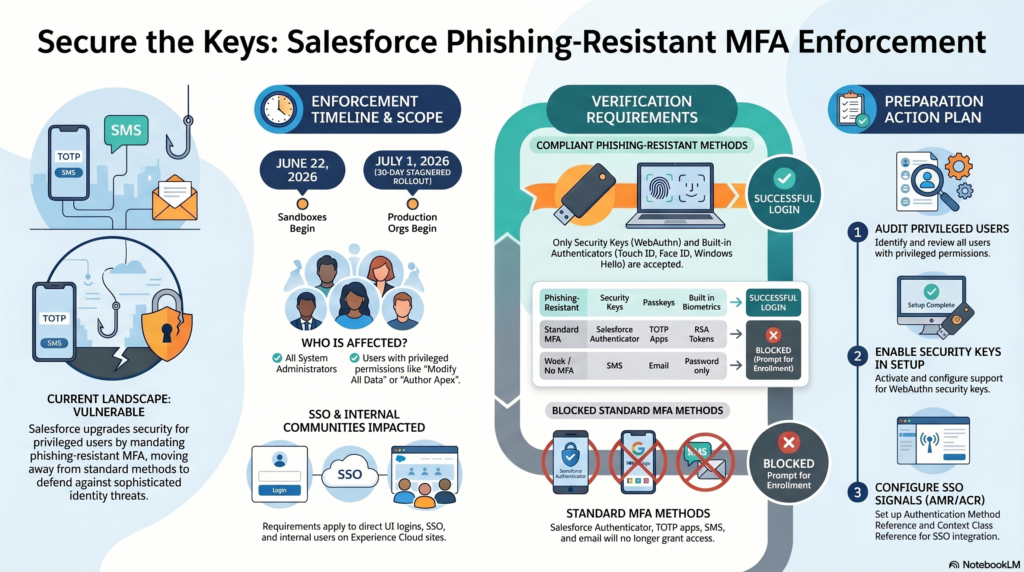
What’s changing
Salesforce Authenticator, TOTP apps (Google/Microsoft Authenticator), SMS, and email are blocked for privileged users. Only these pass:
✅ Security Keys (YubiKey, USB/NFC/Bluetooth FIDO2) ✅ Built-in Authenticators (Windows Hello, Touch ID, Face ID) ✅ Passkeys — device-bound or cloud-synced (1Password, iCloud Keychain, Bitwarden)
Who is a “privileged user”? — more than you think
All 5 of these are in scope:
- System Administrator profile
- Modify All Data
- View All Data ← often overlooked
- Customize Application ← often overlooked
- Author Apex
Applies to direct UI logins, SSO, and internal users on Experience Cloud sites.
⚠️ “Waive Multi-Factor Authentication for Exempt Users” permission no longer works after enforcement. If your org relies on this exemption, act now.
Not affected: API logins (UI only), Developer Edition / trial / scratch orgs, external Experience Cloud users.
🚨 June 16 update — Entra ID admins, this one’s for you
Salesforce just reclassified these AMR signals from Phishing-Resistant → Standard MFA (meaning they now BLOCK privileged users):
❌ pin ❌ user ❌ vbm
If your Microsoft Entra ID or other IdP is sending pin as the AMR value thinking it’s compliant — your admins will hit a blocked login screen starting tomorrow.
From the field — what I’ve actually implemented
🔹 SSO path (Microsoft Entra ID)
I’ve configured:
- AMR signals with
cert→ maps to Certificate-Based Authentication (x.509) - ACR signals with
x509→ Authentication Context Class Reference for client cert
The key gotcha: Entra ID → Salesforce signal handshake must be explicit. If your ACR/AMR values aren’t declared in the SAML/OIDC response, users pass SSO but still hit Salesforce’s enrollment prompt. The signal must be present AND match Salesforce’s accepted values list.
Confirmed valid phishing-resistant signals:
- AMR:
cert,hwk,fido,fido2,passkey,phr,pki,sc,smartcard - ACR:
x509,phr,fido,fido2,hwk,passkey,smartcard,tlsclient,wia
🔹 Non-SSO path
Tested Passkeys and Windows Hello directly — both work seamlessly. Windows Hello is the best UX for enterprise desktop users — no extra device needed, no app to open, just PIN or biometric.
Configure Salesforce for Single sign-on in Microsoft Entra ID
Your 3-step action plan before July 1
1️⃣ Audit privileged users — run this SOQL (Salesforce just published it):
SELECT Id, Name, Email, Profile.Name, IsActive
FROM User
WHERE Profile.PermissionsModifyAllData = true
OR Profile.PermissionsViewAllData = true
OR Profile.PermissionsCustomizeApplication = true
OR Profile.PermissionsAuthorApex = true
2️⃣ Enable Security Keys + Built-in Authenticators in Setup → Identity → Identity Verification. Activate Passkey login for frictionless UX.
3️⃣ Validate your SSO AMR/ACR signals — check Login History (OIDC) or use a third-party SAML decoder for SAML ACR (not yet in Login History, planned for a future release).
Sandbox enforcement starts tomorrow. Use it as your dress rehearsal before production goes live July 1.
Drop questions in the comments — happy to share what I’ve seen work (and what’s caused 3am lockout calls). 👇
🔗 Official article (updated June 16): https://help.salesforce.com/s/articleView?id=005321563&type=1
#Salesforce #SalesforceArchitect #MFA #CyberSecurity #IdentityManagement #MicrosoftEntraID #WebAuthn #Passkeys #SalesforceSecurity #SalesforceAdmin #CloudSecurity #PhishingResistant #ZeroTrust
💡 First comment suggestion (post immediately after publishing): “Save this post — Sandbox enforcement starts June 22, Production July 1. The June 16 signal reclassification (pin/user/vbm) is the one catching orgs off guard right now.”
